Steps:
Clear the CMOS !. you need to:
1. Disconnect the system power cable
2. Remove the CMOS Battery
3. Press the power button to drain residual energy
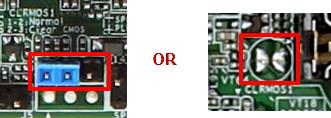
4. Touch/short the 2 points/pads on the CLRMOS pad with a paperclip for at least 5 seconds.
Sample the shape of the Clr_cmos pad:
5. Power on and re-check to the system.